userscriptv2.0.1~138 kBcampus.qairu.edu.kzinstalls: 71
lunatica — for the QAIRU portal
a userscript that reshapes the QAIRU student portal to fit you: customisation down to the single item, an optimised design, the menu set straight, and a timetable made for sharing.
made with love
see it
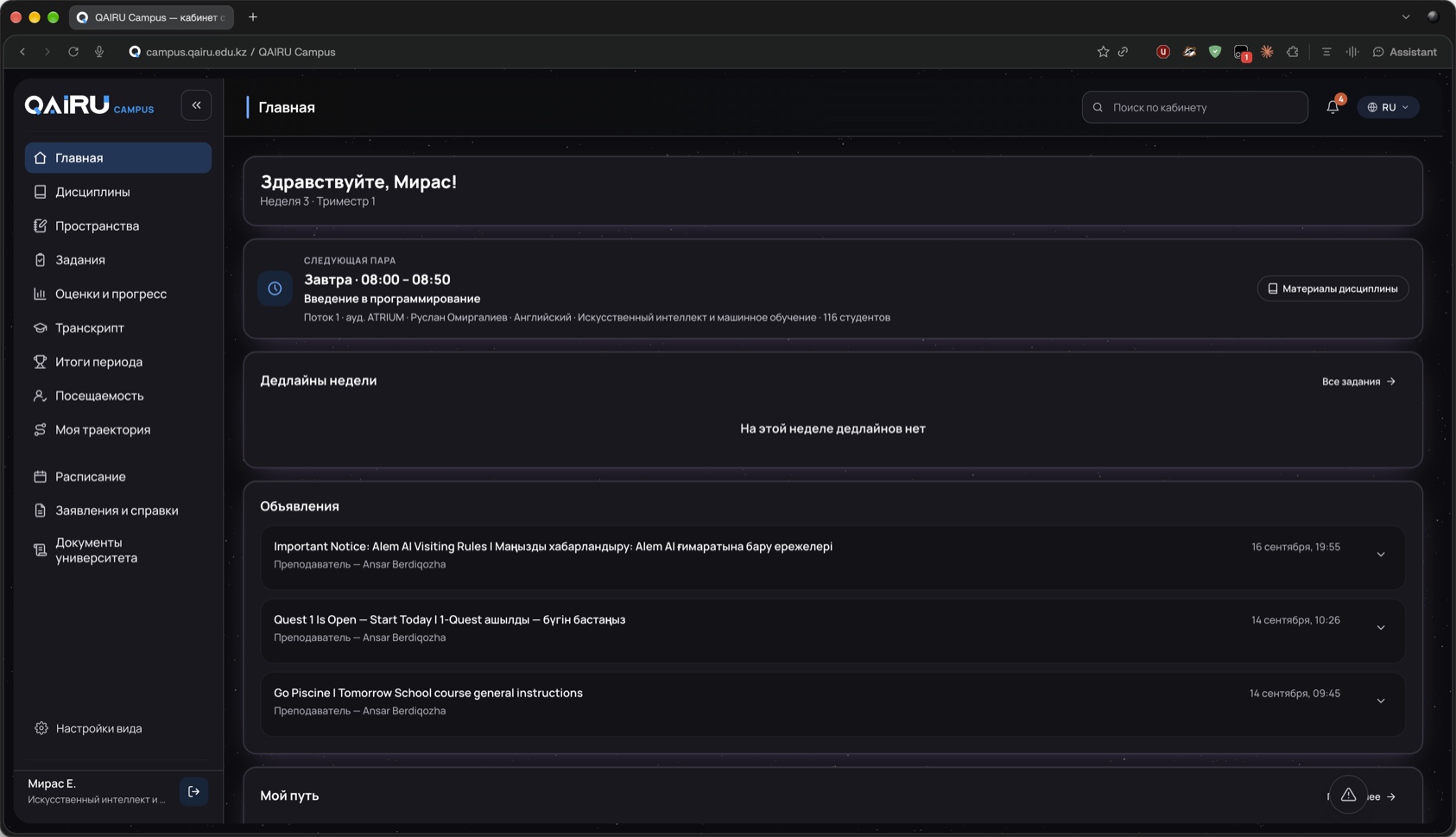
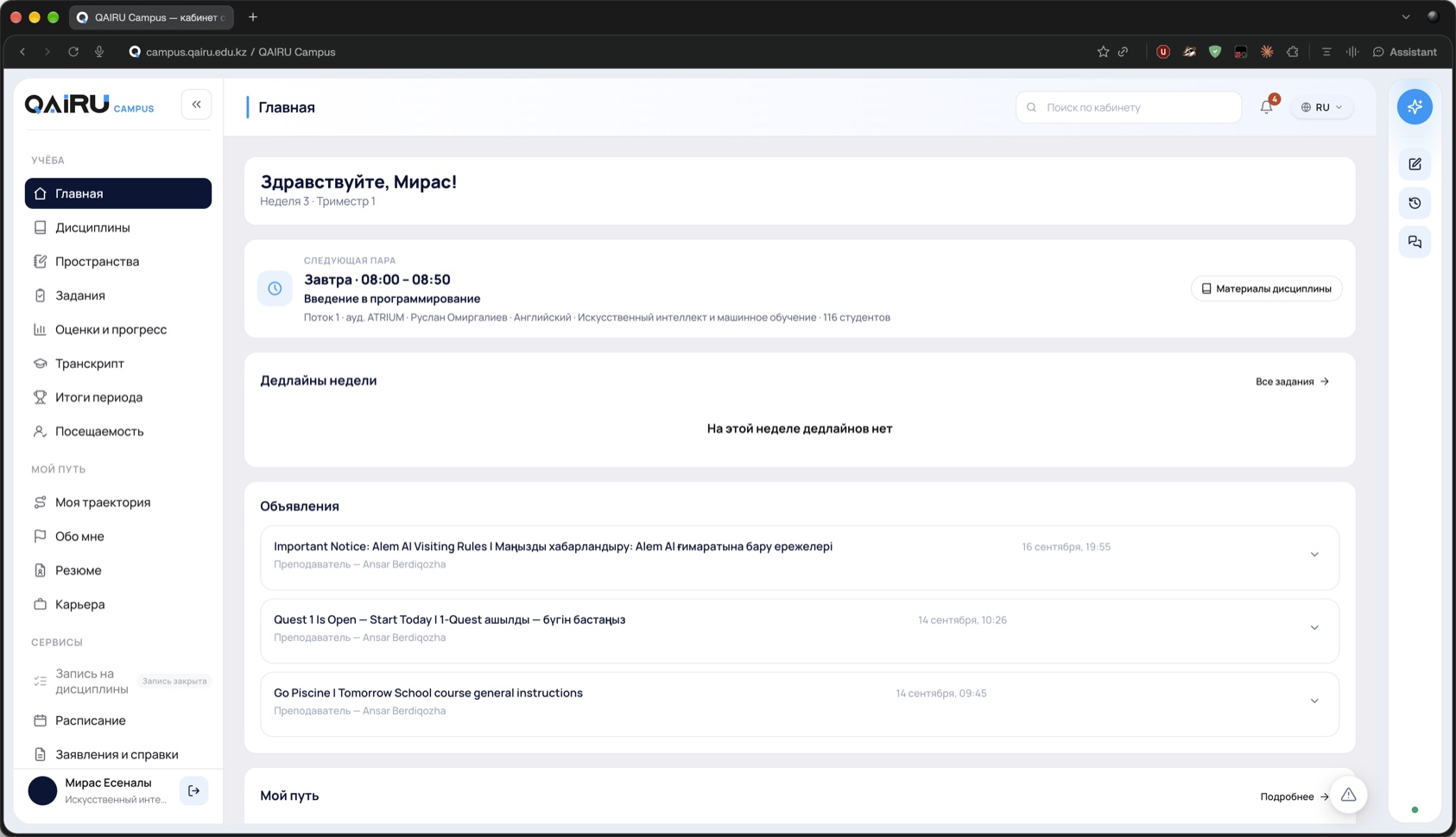
drag the divider — or focus it and use the arrow keys.
the settings these were taken with
miras’ own config, exported from the panel. paste it back over yours and the portal above is what you get — the starfield, the violet card glow, the trimmed menu and the shortened name are all in here.
{
  "theme": "dark",
  "palette": "dark",
  "contrast": "high",
  "cardGlow": true,
  "cardAnim": false,
  "cardColor": "#d2a8ff",
  "animSync": false,
  "animSpeed": 20,
  "animTail": 180,
  "animWidth": 1,
  "bg": "stars",
  "bgUrl": "",
  "bgBlur": false,
  "bgBlurPx": 2,
  "bgDim": 0,
  "starCount": 3500,
  "starSize": 0.6,
  "starBright": 50,
  "starTwinkle": true,
  "starSpeed": 2,
  "hideAiDock": true,
  "hideSidebarPromo": true,
  "hideAskBar": false,
  "hideSearch": false,
  "hideBell": false,
  "hideLocale": false,
  "motion": "off",
  "avatar": "hide",
  "avatarUrl": "https://yt3.googleusercontent.com/6YKmPOgm876NNfbrIlA4kazvLbLiVOoSK-KBlCQfxEHYMHs0dBUIoGpgfbmRNhyj4W7ojxs=s160-c-k-c0x00ffffff-no-rj",
  "nameStyle": "short",
  "nameOrder": "first-last",
  "density": "normal",
  "contentWidth": "default",
  "hideDisabledNav": true,
  "hideNavGroups": true,
  "hiddenNav": [
    "no-link:Course enrollment",
    "/activity",
    "/events",
    "/clubs",
    "/career",
    "/resume",
    "/about-me"
  ],
  "hiddenBlocks": [],
  "loader": false,
  "roomRename": false,
  "roomFrom": "ATRIUM",
  "roomTo": "Амфитеатр",
  "schedHidePastMark": false,
  "schedHidePeople": false,
  "schedDimPast": false,
  "showLauncher": true,
  "panelTab": "more"
}what it changes
takes away
- the aya ai dock(if you ask)the panel that floats over every page
- the promo blockthe ad for aya at the foot of the menu
- dead menu itemsthe ones that never open anyway
- the “class is over” stampthe portal prints “занятие прошло” in every single cell of the timetable
- entrance animationspages appear instead of sliding in
- search, bell, locale(if you ask)the three controls in the header
puts back
- a real dark themethe portal’s own variables, overridden — not a filter laid over the top, so status colours and charts still mean what they meant
- a settings panelalt + q. every line on the left is a switch, and so is every block on the home page
- a readable timetablepast classes dim until you hover; lecturer and stream can go if you only need subject, type and room
- motion, optimisedthe entrance animations are not just switched off — they land at their end state at once, so the page is usable on the first frame instead of after everything has finished arriving
what it is allowed to touch
a userscript declares its own reach at the top of the file, and the manager — not the script — is what enforces it. this is that header, unedited:
Perfection is attained not when there is nothing more to add, but when there is nothing more to remove.
install
get a userscript manager
Tampermonkey for chrome, edge, firefox or safari; Violentmonkey if you prefer open source. either works — this script asks for nothing exotic.
press install
the manager opens the source in a tab and asks once. read it if you like — it is one plain file, no build step, no minifier.
open the portal
the theme is applied before the page paints, so there is no white flash on the way in. nothing to configure — the defaults are the opinionated ones.
using it
- alt + q
- open the settings panel from anywhere
- the menu item
- labelled «Настройки вида» in the sidebar — it can be turned off
- the corner button
- the fallback launcher when the menu item is off
- esc
- close the panel
- reset
- the button at the foot of the panel, labelled «Сбросить» — back to defaults
questions
- will it update itself?
- yes. the @updateURL above points back at this page, so your manager checks it for new versions on its own schedule.
- what happens when the portal is redesigned?
- the theme survives most of it — it rides on the portal’s own CSS variables. the parts that hide specific blocks are matched by selector, and those are the ones that can quietly stop applying. tell me when that happens.
- does it work on a phone?
- on the same pages in a mobile browser, yes, if that browser can run a userscript manager. firefox on android can; safari on ios needs a manager from the app store.
- how do I remove it?
- the manager’s dashboard, one click. nothing is left behind on the portal.